How to Trade in Cobblemon: Every Way to Swap Pokémon
By Poke Legends Team · Published · Last updated
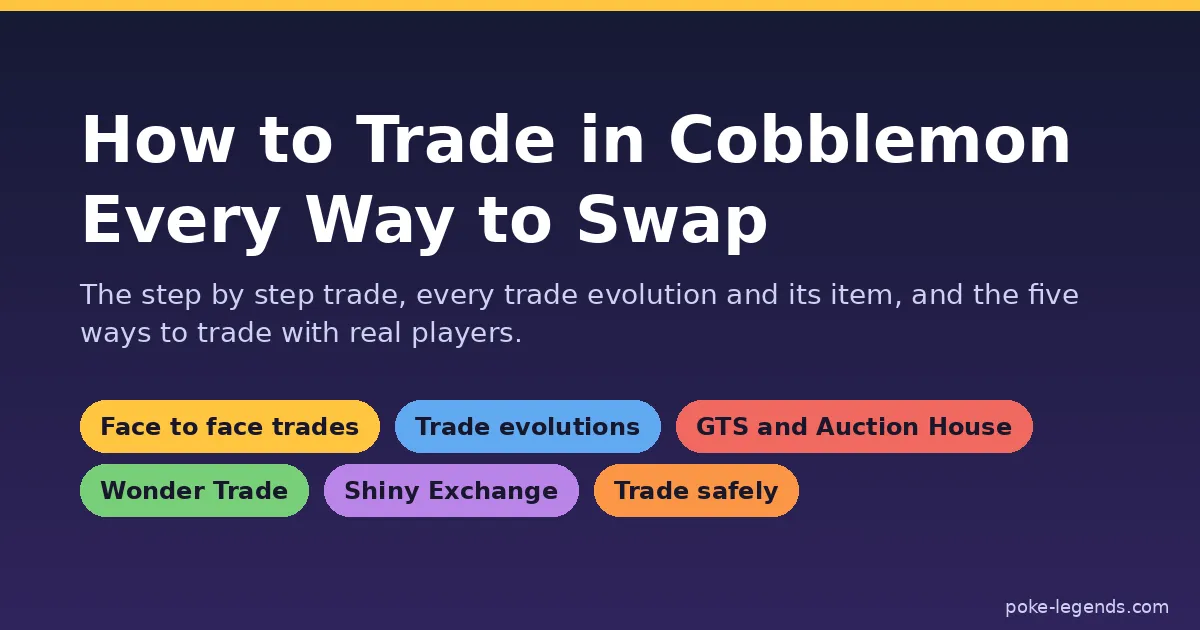
To trade in Cobblemon, put the Pokémon in your party, look at the other player and press R, then pick Trade. Once they accept, each of you offers one Pokémon, you both accept, and the swap happens on the spot. That’s the whole face to face trade, and it’s built into the mod. Everything past that, like trading with someone who’s offline or swapping with a stranger, depends on the server you play on.
This is the official website of the Poke Legends Cobblemon server. This guide is the full trading hub: the step by step trade, why a trade fails, every trade evolution checked against the Cobblemon species data, and the four extra ways to trade on our server.
If you want to trade with real players today, the short steps are on our join page.
1. Why Poke Legends is the best Cobblemon server for trading
Stock Cobblemon gives you one way to trade: two players standing next to each other. That’s fine for you and a friend. It’s not a trading scene. On Poke Legends you get five ways to move Pokémon, all in one place:
- Face to face with the R key or
/trade [player], with trade evolutions working as normal. - The GTS at
/gts, a market for Pokémon and items with buy orders, so you can trade with players who aren’t online. - The Auction House at
/ah, where players bid on what’s up for auction. - Wonder Trade at
/wondertrade, a random swap for when you just want something new. - The Shiny Exchange at
/shinyexchange, which turns spare shinies into Shiny Credits.
All 1025 Pokémon are on the server, so there’s always someone hunting a species you have spare. Every command above is on our trading wiki page, and all of it sits in the Economy section of /menu.
2. How to trade face to face in Cobblemon, step by step
This works the same on any Cobblemon server, ours included:
- Put the Pokémon in your party. The trade screen only shows your party, not your PC. You both need at least one Pokémon in your party or the request fails.
- Stand close and look at the other player. The request only goes through when you’re near them and looking straight at them, with nothing in between.
- Press R and pick Trade. R is the default key. You can also type
/trade [player]on Poke Legends. - They accept the request. It shows up on their screen and runs out if they ignore it, so tell them it’s coming.
- Each of you picks one Pokémon. You both see what the other is offering.
- Both of you accept. The swap only happens when both sides have accepted, and if anyone changes their pick, both acceptances reset.
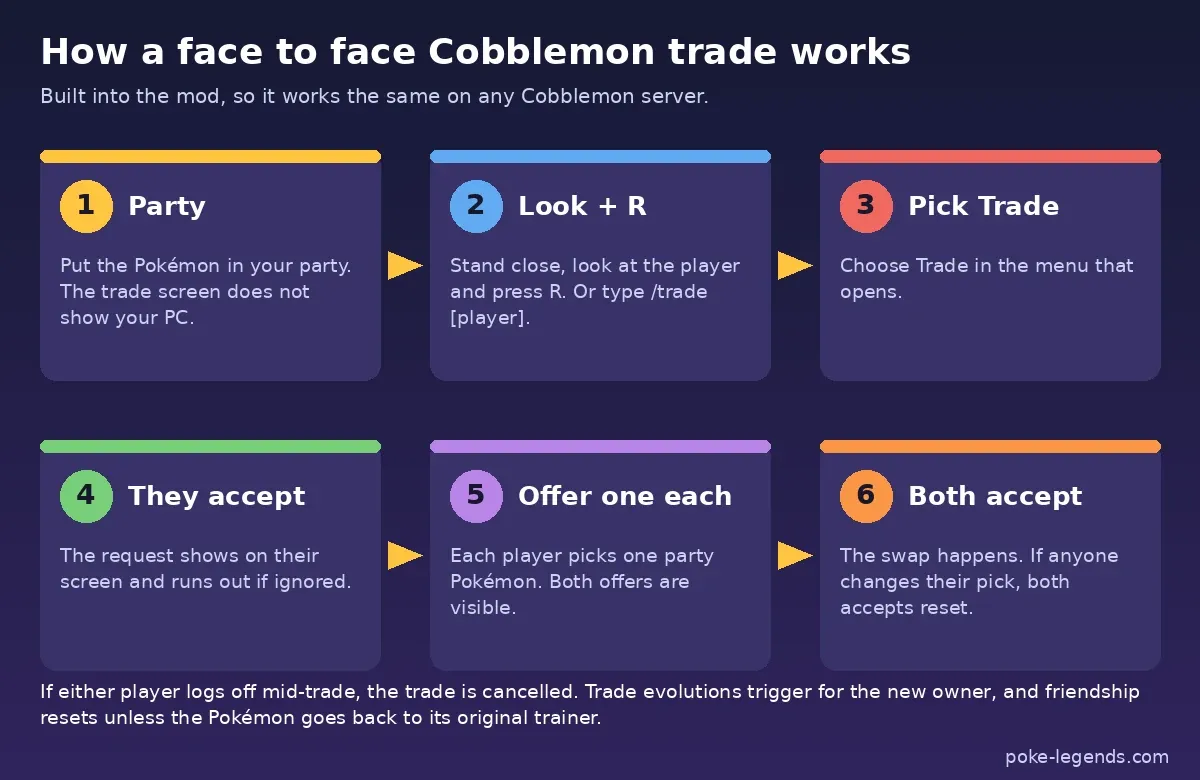
That last rule is your best protection. Nobody can swap in a different Pokémon after you’ve clicked accept, because the change wipes your acceptance and you have to accept again. If either player logs off mid-trade, the trade is cancelled and both Pokémon stay where they were. Getting a group onto the same server is covered in our guide to playing Cobblemon with friends.
3. Cobblemon trading not working? Check these first
Most failed trades come down to one of these:
- Too far away or not looking at them. The request checks distance and line of sight. Walk up until you’re right next to them and aim at their body, not the floor.
- Not in the same world. You have to be in the same world, in the same place, to trade face to face. If you can’t see each other, you can’t trade.
- The Pokémon is in your PC. Move it to your party first.
- The request ran out. Requests expire if nobody accepts. Send a fresh one.
- Someone is busy. A player who’s already in a trade can’t start another one.
Still stuck connecting at all? Our how to join a Cobblemon server guide walks through version and mod problems.
4. Cobblemon trade evolutions and the items they need
Some Pokémon evolve when they’re traded. The Pokémon evolves for its new owner, who confirms it with Evolve in the Summary screen. If the evolution needs a held item, the Pokémon has to be holding it when it’s traded, and the item is used up.
We checked the Cobblemon species data for every trade evolution. There are 26 on base species:
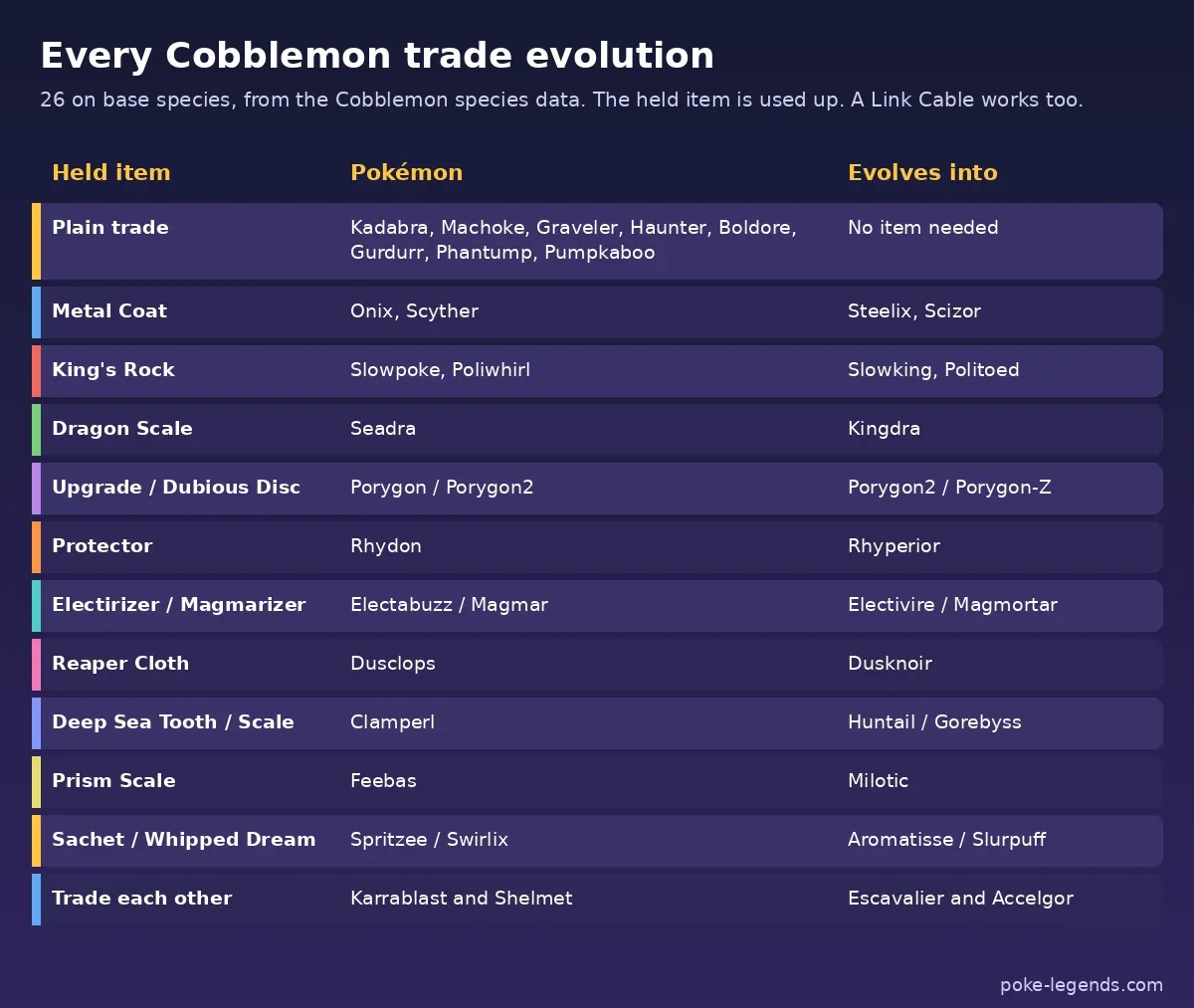
| Trade with no item | Trade while holding an item |
|---|---|
| Kadabra, Machoke, Graveler, Haunter, Boldore, Gurdurr, Phantump, Pumpkaboo | Onix and Scyther (Metal Coat), Slowpoke and Poliwhirl (King’s Rock), Seadra (Dragon Scale), Porygon (Upgrade), Porygon2 (Dubious Disc), Rhydon (Protector), Electabuzz (Electirizer), Magmar (Magmarizer), Dusclops (Reaper Cloth), Clamperl (Deep Sea Tooth or Deep Sea Scale), Feebas (Prism Scale), Spritzee (Sachet), Swirlix (Whipped Dream) |
Karrablast and Shelmet are the odd pair: trade one for the other and both evolve, into Escavalier and Accelgor.
No partner? A Link Cable does the same job. Craft it from Nether Quartz, Copper Ingots and an Ender Pearl, and give the Pokémon its held item first if it needs one. On Poke Legends, /evolveguide lists the trade evolutions in game, and our evolution guide covers the Link Cable and every other method.
One catch: a traded Pokémon’s friendship resets to its species’ starting value. If it’s traded back to its original trainer, its old friendship comes back. So don’t trade away a Pokémon that’s close to a friendship evolution unless you’re getting it back.
5. Trade with anyone, even offline: the GTS and Auction House
Face to face trades need both of you online and in the same spot. The GTS doesn’t. Type /gts and you get a market for Pokémon and items, paid for in in-game money:
- List a Pokémon from your party or an item, and it waits for a buyer while you play.
- Browse listings and hover any Pokémon to see its level, nature, ability, IVs, moves, held item, ball and Tera type before you buy. Quick filters pull up shinies, hidden abilities and 5 IV+ Pokémon.
- Place a buy order for a species nobody is selling, and it fills when a seller matches.
- Collect sales, filled buy orders and anything that didn’t sell with
/gts claims.
The Auction House at /ah is the bidding side. Players bid on what’s up for auction, and if you’re outbid, your bid comes straight back to you. Our Cobblemon GTS and Wonder Trade guide goes deeper on both.
6. Wonder Trade and the Shiny Exchange
Wonder Trade (/wondertrade) swaps one of your Pokémon for a random one from the server. You can’t offer legendaries, mythicals, Ultra Beasts or eggs, and trades and shiny pulls are announced in chat. It’s a fun way to clear out spare catches and maybe pull something you’d never have found.
The Shiny Exchange (/shinyexchange) is for duplicate shinies. It turns them into Shiny Credits, and credits buy a Shiny Token, which turns any non-legendary Pokémon shiny, or a Shiny Legendary Wand for legendaries. The menu also shows the server’s top shiny hunters. Our shiny hunting guide explains how trades also help with Masuda breeding, since a Pokémon from another language is enough to start a pair.
7. Which trade method should you use?
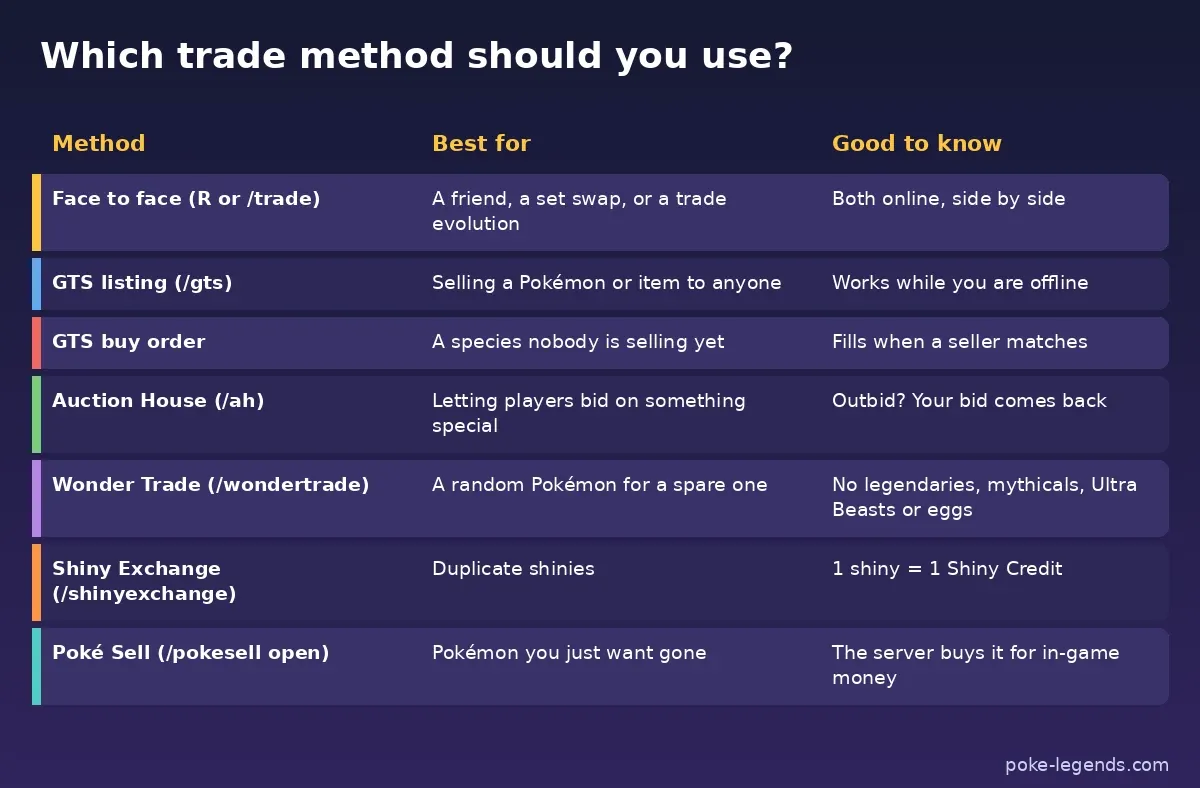
| You want to… | Use |
|---|---|
| Swap with a friend or trigger a trade evolution | Face to face, R or /trade |
| Sell to whoever’s online, any time | GTS listing |
| Get a species nobody is selling | GTS buy order |
| Let players bid on something special | Auction House, /ah |
| Get a random Pokémon for a spare one | Wonder Trade |
| Turn duplicate shinies into something useful | Shiny Exchange |
| Sell Pokémon you don’t need to the server | Poké Sell, /pokesell open |
Trading items rather than Pokémon? Chest shops let other players buy from you while you’re offline. Our player shops guide shows how to set one up.
8. How to trade safely and find trade partners
Trades are final, so a few habits save a lot of pain:
- Check before you accept. In face to face trades, look at what’s on offer before you click. On the GTS, hover the listing and read the IVs, nature and ability.
- Never pay first for a promised trade. If someone wants money for a face to face trade, use the GTS instead. It handles the payment for you.
- No real-money trading. Trading Pokémon or items for real-world money is against our server rules.
Looking for someone to trade with? New GTS listings are announced in chat, so you’ll see who’s selling. The Poké Mart area at /warp Pokemart has shops and the GTS together. Guilds give you a crew to trade with, covered in our guilds guide, and our Discord is the best place to ask for a specific Pokémon.
9. Start trading on Poke Legends
Join, pick a world in the hub, and open /menu. Everything above sits in the Economy section. New to servers? The steps are on our join page.
On Poke Legends: Face to face trades with R or
/trade [player], with trade evolutions and/evolveguideto list them. The GTS at/gtsfor Pokémon and items, with buy orders and/gts claims. The Auction House at/ah. Wonder Trade at/wondertrade. The Shiny Exchange at/shinyexchange. Poké Sell, chest shops and guilds. All 1025 Pokémon. Java Edition 1.21.1 with the Cobblemon mod; our modpack is optional. IPmc.poke-legends.com.
🎮 Ready to trade? Join mc.poke-legends.com, open /gts, and come say what you’re looking for in our Discord.
Frequently asked questions
How do you trade in Cobblemon?
Put the Pokémon you want to trade in your party, stand close to the other player, look at them and press R. Pick Trade from the menu and they accept. Each of you picks one party Pokémon, both of you accept, and the swap happens. On Poke Legends you can also type /trade [player].
Can you trade in Cobblemon single player?
There is nobody to trade with in single player, but you don't need a partner for trade evolutions. Use a Link Cable on the Pokémon instead. If the evolution needs a held item, like Onix with a Metal Coat, give it the item first.
Why is Cobblemon trading not working?
The usual causes are distance and line of sight, an empty party on one side, or the request running out before it was accepted. Stand right next to the other player, look straight at them, make sure you both have the Pokémon in your party, and send the request again.
Do trade evolutions work in Cobblemon?
Yes. Pokémon like Kadabra, Machoke, Graveler and Haunter evolve when traded, and others need a held item, like Scyther with a Metal Coat. Karrablast and Shelmet evolve when you trade one for the other. A Link Cable does the same job without a partner.
Does trading reset friendship in Cobblemon?
Yes. A traded Pokémon's friendship drops to its species' starting value. If it is ever traded back to its original trainer, its old friendship comes back.
Can I trade with players who are offline on Poke Legends?
Yes. List a Pokémon or item on the GTS with /gts, place a buy order, or run an auction with /ah. Finished trades wait for you in your collection box at /gts claims.
Do I need a modpack to join Poke Legends?
No. You need the Cobblemon mod for Minecraft Java Edition 1.21.1. Our modpack is optional and sets everything up for you.