Cobblemon GTS and Wonder Trade: Listings and Swaps
By Poke Legends Team · Published · Last updated
A good Cobblemon GTS lets you list the Pokémon or item you actually want to move, see the important details before you buy, and place a buy order when the one you want is not listed yet, with a Wonder Trade next to it for a random swap. Poke Legends is the best Cobblemon server for a GTS and Wonder Trade, and here’s exactly what that looks like before you join.
This is the official website of the Poke Legends Cobblemon server. The GTS and Wonder Trade already appear in our guide to Cobblemon servers like the games and, briefly, in how to play with friends. This page is the trading system itself: listings, buy orders, auctions, Wonder Trade, and the plushie option in the same menu.
🎮 Join mc.poke-legends.com on Java Edition 1.21.1. The Cobblemon mod is required, and our modpack is optional.
Why Poke Legends has the best Cobblemon GTS and Wonder Trade
Base Cobblemon can trade face to face, but it has no Global Trade Station and no Wonder Trade. The server has to build both. Here’s what you get with us:
- A GTS at
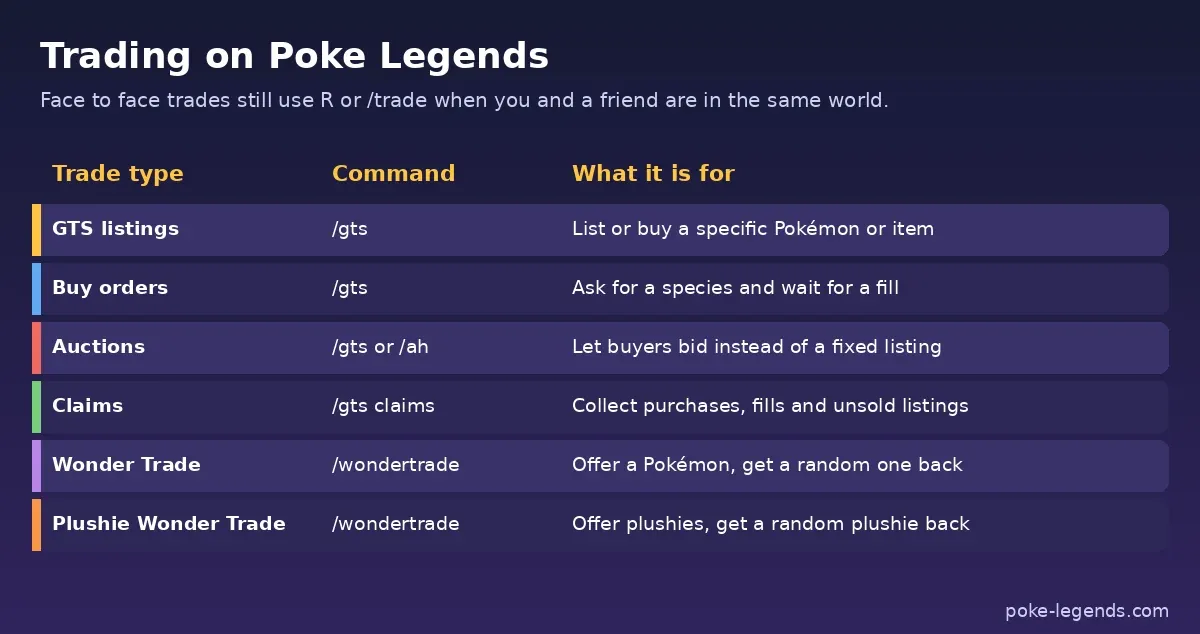
/gtswith a Pokémon market, an item market, buy orders and auctions. - Listings that show the details that matter, including level, ability, nature, IVs, moves, held item, ball and whether the Pokémon is shiny.
- Quick filters for shinies, hidden abilities and high-IV Pokémon, plus a claims box at
/gts claimsfor finished trades. - Wonder Trade at
/wondertrade, including a plushie option, with legendaries, mythicals, Ultra Beasts and eggs kept out of those swaps. - Face to face trades with R or
/trade, including trade evolutions, when you want to swap with a specific person.
If you want the rest of the main-series loop around this, start with Cobblemon servers like the games.
1. What a good Cobblemon trading server needs
A trade button is not a GTS. If you’re choosing a server because you want to move Pokémon the way the games do, you need a market you can browse, a listing you can trust, a way to ask for a species that is not up yet, and a random swap for the days you just want something new.
That means a Pokémon market and an item market, not a single dump of unnamed sprites. It means the listing tells you the ability, the IVs and the moves before you buy. It means buy orders, so you can wait for a species instead of refreshing all afternoon. And it means a Wonder Trade with clear rules about what you can offer, so a random swap does not become a way to dump something the pool should never take.
Stock Cobblemon does not include a GTS or a Wonder Trade. Those only exist if the server added them, which is why “Cobblemon GTS” and “Cobblemon Wonder Trade” are real shopping questions. Face to face trading is still useful, and we keep it, but it is not a substitute for a market that stays up when the other person is offline. How to get onto a Java server is in our join guide.
2. List and shop on the GTS
On Poke Legends, /gts opens the Global Trade Station. You can also find it in the Economy section of the server menu at /menu. The landing menu is the same idea as a real GTS: a Pokémon market, an item market, a Sell flow, buy orders, auctions, and a place to collect what you are owed.
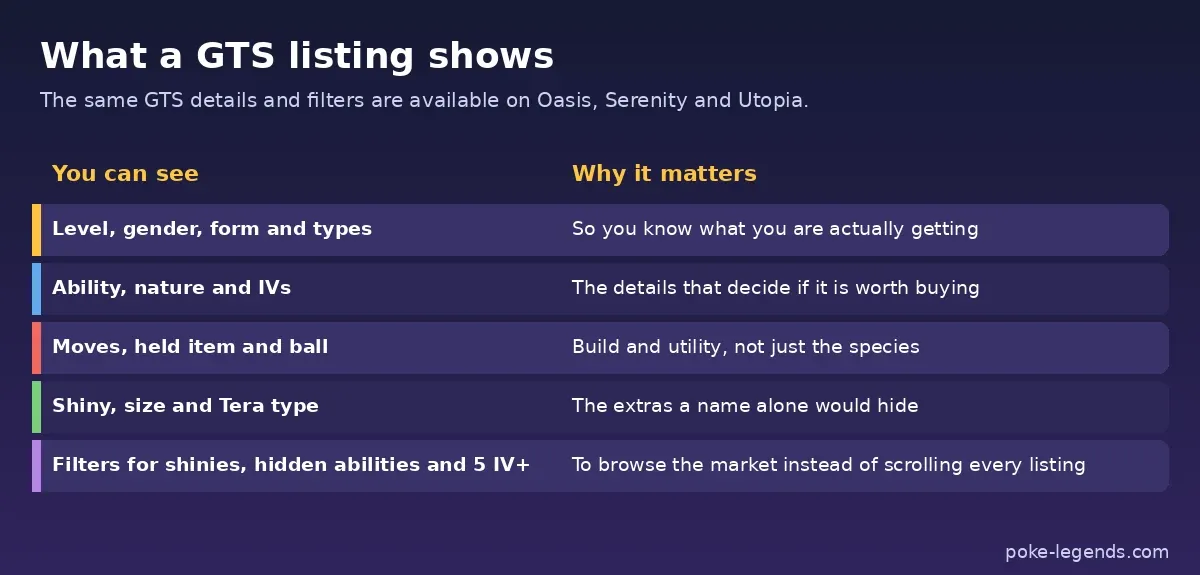
When you sell, you pick a Pokémon from your party or your PC, or you pick an item, and you choose a fixed-price listing or an auction. New listings can be announced in chat, so a good offer does not have to hide in a menu. When you browse, listings show the seller and the details you actually need: level, gender, form, types, ability, nature, IVs, moves, held item, ball, size, Tera type, and whether the Pokémon is shiny or still tradeable. You are not guessing from a species name alone.
The Pokémon market also has quick filters, and the ones that are the same on every world include shinies, hidden abilities and Pokémon with 5 or more perfect IVs. Default sort is newest first, and you can buy from the market after a confirm step. This is the page for finding a specific Pokémon. Broader collecting, including hats and plushies you might later trade, lives in our cosmetics guide.
3. Buy orders, auctions and claims
A market is only half of a GTS if you can only buy what happens to be listed right now. Buy orders are on, and they live in the same /gts menu. You set the species you want and wait; when someone fills the order, the Pokémon goes to your claims box.
Auctions are on too. You can open them from the GTS, or with /ah. Instead of a fixed price, buyers bid, and the listing is marked as an auction in the market. If you are outbid, or if a listing expires unsold, the Pokémon or item does not vanish. It waits in /gts claims (also called the collection box), which is also where you pick up purchases and filled buy orders. Check claims after a sale, a buy or a cancelled listing so nothing sits uncollected.
The other person does not have to be online at the same moment, and you still collect the completed trade from claims. For playing with a crew in the same world, including face to face trades, use our friends guide.
4. Wonder Trade, including plushies
Wonder Trade is the other half of server trading. Type /wondertrade, or open it from the same Economy menu. You pick a Pokémon from your party or your PC, confirm, and get a random one back. Shinies that come through can be announced in chat, and so can ordinary trades, so a good swap can be a small event in the world rather than a silent menu click.
The rules are meant to keep the pool fair. You cannot Wonder Trade legendaries, mythicals, Ultra Beasts or eggs. Paradox Pokémon are also kept out of the generated pool. If a Pokémon cannot be offered, the menu marks it clearly instead of failing after you confirm.
The same menu has a Plushie Wonder Trade. You offer plushies from your inventory and receive a random plushie back. That is a way to shuffle a collection without turning the GTS into a cosmetics catalog. How plushies are placed, and how a Vote Party can add to a collection, stays in the cosmetics guide.
Wonder Trade is for a surprise. The GTS is for a specific Pokémon. Both are on from the day you join.
5. Still trade face to face when you want to
A GTS does not replace a trade with a person standing next to you. Look at another player and press R, the default key, or use /trade. That is the right tool when you already agreed on the swap, or when you are evolving a Haunter, Kadabra, Machoke or Graveler. Those trade evolutions work here. If the other player is offline, a Link Cable can do the same job, and the details live in our evolution guide.
Face to face trades need you in the same world. Oasis, Serenity and Utopia each keep their own progress, so pick the same one as your friend before you try to trade in person. The GTS and Wonder Trade are the tools you use when that person is not around, or when you are shopping the whole server rather than one trade window. The friends guide covers how to meet up. This page is the market and the random swap.
6. Start trading on Poke Legends
Join mc.poke-legends.com, pick a world, and open /gts or /wondertrade. The trading system is the same on Oasis, Serenity and Utopia. If you are trading face to face, be in the same world. Listings, buy orders and Wonder Trade can be used whenever you are on.
New to joining a Cobblemon server? Start with how to join. If you want the wider tour after this, the best Cobblemon servers checklist is the next stop, and the in-game Trading page is there if you want a short command list.
On Poke Legends: a full GTS at
/gts, with a Pokémon market, an item market, buy orders, auctions and a claims box at/gts claims. List from your party or your PC. Listings show level, ability, nature, IVs, moves, held item, ball and shiny status, and you can filter for shinies, hidden abilities and high-IV Pokémon. Wonder Trade at/wondertrade, including a plushie option. You cannot Wonder Trade legendaries, mythicals, Ultra Beasts or eggs. Face to face trades use R or/trade, and trade evolutions work. Java Edition 1.21.1 with Cobblemon; the Cobblemon mod is required and our modpack is optional. IPmc.poke-legends.com.
Ready to list or swap?
Frequently asked questions
Does Cobblemon have a GTS?
Not in the base mod. A Global Trade Station has to be added by the server. On Poke Legends, /gts opens a Pokémon market, an item market, buy orders and auctions.
How does Wonder Trade work on a Cobblemon server?
You offer a Pokémon and get a random one back from the server's Wonder Trade. On Poke Legends that is /wondertrade. You cannot offer legendaries, mythicals, Ultra Beasts or eggs, and the same menu has a plushie Wonder Trade.
What should I look for in a Cobblemon server with a GTS?
A market where you can list Pokémon and items, enough listing detail to shop with confidence, a way to place buy orders, and a Wonder Trade for when you want a random swap instead of a priced listing.
How do I open the GTS or Wonder Trade on Poke Legends?
Type /gts or /wondertrade, or open the Economy section of the server menu with /menu. Finished GTS trades are collected with /gts claims.
Can I trade face to face as well?
Yes. Look at another player and press R, or use /trade. Trade evolutions work. That kind of trading, and how to be on the same world as a friend, is covered in our guide to playing with friends.
Do I need a modpack to join Poke Legends?
No. You need the Cobblemon mod for Minecraft Java Edition 1.21.1. Our modpack is optional, and it adds a Play Now button and puts the server in your list.