Cobblemon Resource World: Fresh Ores, Wood and Biomes
By Poke Legends Team · Published · Last updated
Want a Cobblemon Resource World so you can mine and gather without tearing up the land you actually live on? Poke Legends is the best Cobblemon server for a Resource World, because /resourceworld takes you to a separate gathering world, claiming is turned off there, and that world gets reset, so your real base stays on the land you claimed.
This is the official website of the Poke Legends Cobblemon server. Claims, homes and /rtp for finding a place to settle are already in our best Cobblemon survival servers guide. This page is the Resource World itself: how to get there, why you should not build there, and how it is different from a random teleport in the main world.
🎮 Join mc.poke-legends.com on Java Edition 1.21.1. The Cobblemon mod is required, and our modpack is optional.
1. What to look for in a Cobblemon Resource World
A Resource World only works if it is actually a second world, not a corner of the same map you built your house on. If mining happens in the world you live in, every good ore vein is also a hole next to someone’s base. If you can claim and settle in the gathering world, it stops being a resource world and turns into a second survival world that will get messy, then empty.
When you compare Cobblemon servers on this, ask a few plain questions. Is there a command that takes you to a separate world for gathering? Is claiming turned off there, with a clear warning not to build a base? Does that world get reset, so resources can come back? And can you take what you mine back to claimed land in the world you actually live in?
Poke Legends answers yes to all of that, with the same /resourceworld menu on every world. The survival checklist is still the right page for land claims and homes. This page stays on the gathering world those claims are meant to protect.
2. How to get to the Resource World
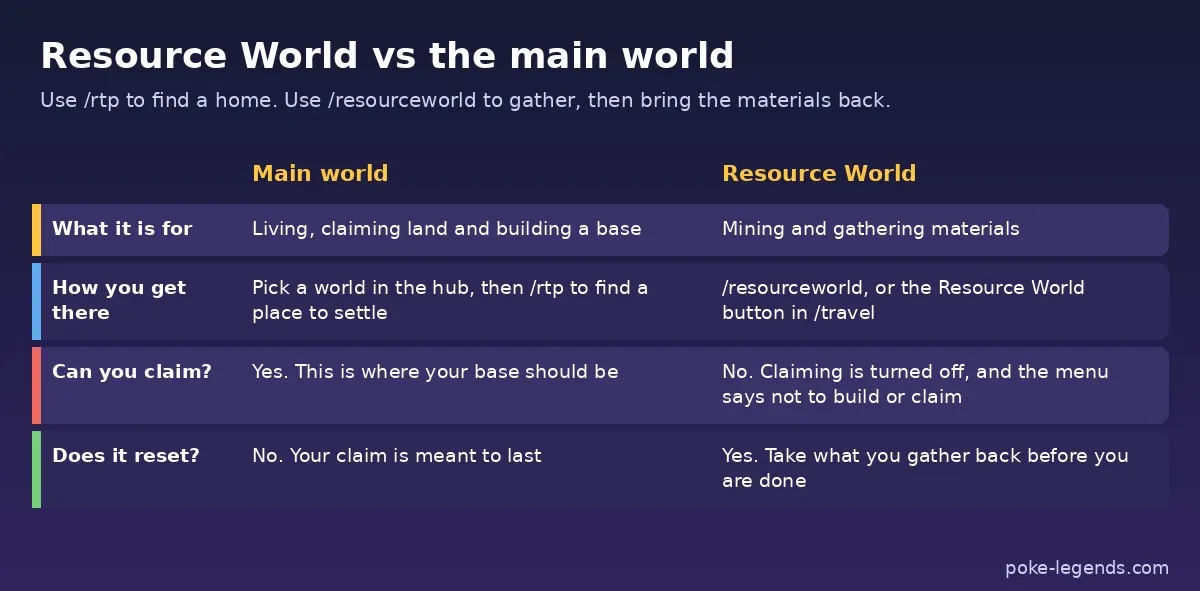
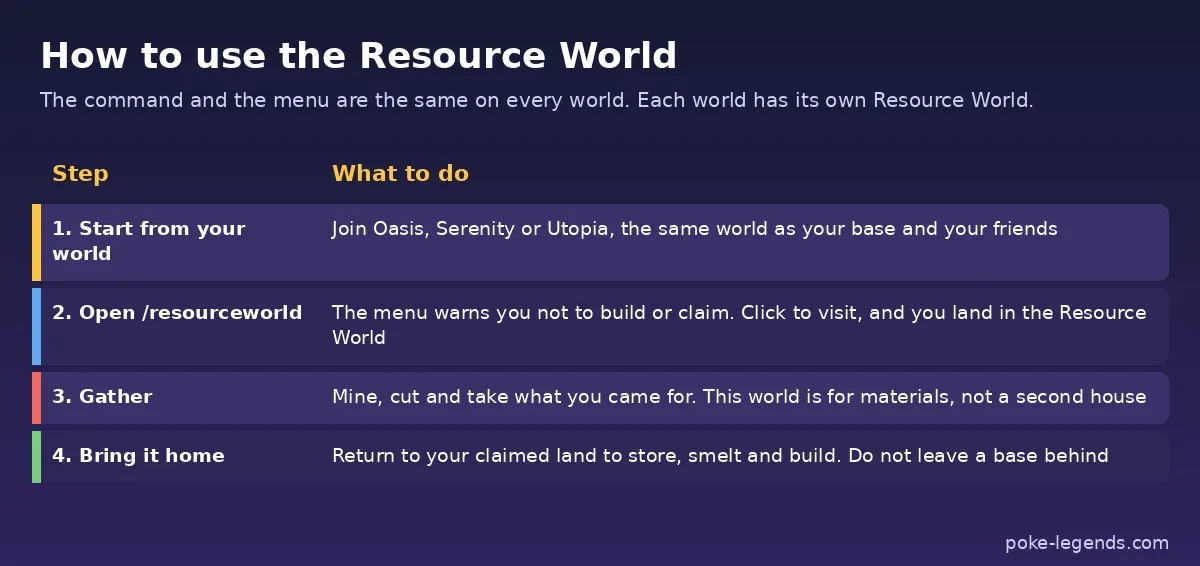
Type /resourceworld. That command opens a Resource World menu. Click to visit, and you are taken into the Resource World with a random teleport in that world, not in the overworld you just left. The menu also spells out the rule in plain language: do not build your base or claim here.
You can get to the same menu from Travel. Type /travel (or /warplist) and use the Resource World button. That is handy if you already use Travel to move around, but you do not need it. /resourceworld is enough on its own.
The command and the menu are the same on Oasis, Serenity and Utopia. Each of those worlds has its own Resource World, so go on the world where your base already is. If you are playing with a friend, pick that world together first, then go gather. Our guide to playing Cobblemon with friends covers how to land on the same world.
3. Mine and gather, but do not build a base there
The Resource World exists so you can mine, cut and gather without carving up the land around your house. That is the whole point. You go in, you take what you need, and you leave.
Two rules make that work. First, the menu tells you not to build your base or claim in the Resource World. Second, claiming is turned off in that world, so you cannot plant a claim there and treat it like a second home. The Resource World gets reset. When it does, anything left there is gone. We are not going to post a reset clock on this page, because that date can move. The practical habit is simple: take your ores, wood and other materials back to your claimed land before you are done.
That is also why a Resource World is a better gathering loop than strip-mining next to spawn in the main world. The main world is where bases, paths and farms should last. The Resource World is where a mountain can be mined out. If you also like fishing as a gathering loop, our Cobblemon fishing guide covers the skill, goals and hunts that go with a rod. Use this page for the world you visit when you want to mine.
4. How this is different from /rtp in the main world
/rtp (also /wild) is a random teleport in the world you already live in. It is how you find a patch of land to settle, then set a home. That use belongs on the survival page, next to claims and /sethome.
/resourceworld is not a second /rtp. It takes you out of that world and into the gathering world. A random teleport still happens, but it happens inside the Resource World, so you land somewhere you can start mining, not somewhere you should start a house. If you mix the two up, you either start a base in a world that will reset, or you dig a quarry next to the land you were trying to keep nice.
A useful split is this. Use /rtp when you want to live somewhere. Use /resourceworld when you want to take something home. The Travel menu has both, which is why the Resource World button is its own tile, not a second label on RTP.
The Resource World also has a real spread of overworld biomes, so a gathering trip is not one repeated hillside. You can end up in forests, plains, jungle, badlands, mushroom fields, snow and more. You do not need a biome list to start. Open /resourceworld, mine what you came for, and leave.
5. Bring what you gather back to your real world
A Resource World is only half a feature if you have nowhere safe to store what you brought back. On Poke Legends, that safe place is the world you picked in the hub, on land you claimed. Mine in the Resource World, then go home and build, smelt and store there. The claim system, homes and the rest of the survival loop are in our survival guide, so this page will not repeat the claim-block numbers or how to set a home.
Gathering also feeds the rest of the server. Mining, foraging and excavation are among the 16 trainer skills that level as you play, so a Resource World trip is not wasted motion. What you take back can be used to build, to craft, or to keep a farm running next to the base you are actually trying to keep. The Pokédex on that world is all 1025 Pokémon, but the Resource World itself is for materials, not for settling a team in a temporary camp.
If you went gathering with a friend, come back to the same world you left from. Progress stays on that world, including the storage you return to.
6. Why Poke Legends is the best Cobblemon server for a Resource World
Plenty of servers will tell you to go mine somewhere. The test is whether that somewhere is a real second world, whether you are stopped from settling there, and whether your actual base is still waiting when you get back. Poke Legends puts that in /resourceworld: a separate gathering world on Oasis, Serenity and Utopia, a menu that tells you not to build or claim, claiming turned off, and a world that gets reset so you can gather again.
/rtp stays the tool for finding a home in the main world. /resourceworld stays the tool for mining without wrecking that home. Travel can open the same Resource World menu if you already have /travel in your muscle memory. Take what you mine back to claimed land, and the rest of survival, skills and the Pokédex are still there when you return.
On Poke Legends: the best Cobblemon server for a Resource World. Open it with
/resourceworld, or from/travel. It is a separate world for mining and gathering. The menu tells you not to build your base or claim there, claiming is turned off, and the world gets reset. Use/rtpto find a place to live in the main world, then bring Resource World materials back to that claim. All 1025 Pokémon. Java Edition 1.21.1; Cobblemon mod required, modpack optional.
Ready to gather on Poke Legends?
- Install Cobblemon for 1.21.1 (or our modpack).
- Join
mc.poke-legends.comand pick a world. - Type
/resourceworld, gather what you need, and take it back to your claimed land.
Full steps are in our how to join a Cobblemon server guide.
🎮 Join our Discord. See you in the Resource World, Trainer.
Frequently asked questions
What is a Cobblemon Resource World?
It is a separate world for mining and gathering, so you can take materials without tearing up the world you live in. On Poke Legends you open it with /resourceworld, or from the Travel menu with /travel.
Can I build a base or claim land in the Resource World?
No. The menu tells you not to build your base or claim there, and claiming is turned off in that world. The Resource World gets reset, so anything you try to settle there is lost. Claim and build in the main world instead.
How is the Resource World different from /rtp?
/rtp drops you in a random spot in the world you live in, which is how you find a place to settle. /resourceworld takes you to a different world meant for gathering. Use /rtp to find a home. Use the Resource World to mine, then bring the materials back.
How do I get to the Resource World on Poke Legends?
Type /resourceworld and click to visit, or open /travel and use the Resource World button. That command is the same on Oasis, Serenity and Utopia.
Does the Resource World reset?
Yes. It gets reset so there are fresh resources to gather. That is why you should not build or claim there. We do not post a reset clock here, because the date can move. Take what you mine back to your claimed land before you log off.
Do I need a modpack to join Poke Legends?
No. You need the Cobblemon mod for Minecraft Java Edition 1.21.1. Our modpack is optional, and it adds a Play Now button and puts the server in your list.