Cobblemon Mod or Modpack: Which One Should You Install?
By Poke Legends Team · Published · Last updated
Install the plain Cobblemon mod if you want the lightest setup and don’t mind managing files yourself, and install a modpack if you want everything set up for you in one click, ideally the one built for the server you plan to join. Both get you into Cobblemon. The difference is how much work you do and how likely you are to hit a version mismatch when you go online.
This is the official website of the Poke Legends Cobblemon server. We support both routes, so this guide is an honest look at each, with our own modpack as the worked example.
If you want to skip straight to playing, the short steps are on our join page.
1. Why Poke Legends is the easiest server to join either way
You don’t have to pick one path to play on Poke Legends. Either one works:
- The plain mod is enough. You need the Cobblemon mod for Minecraft Java Edition 1.21.1. Gyms, raids, ranked battles and the rest run on our side, so there’s nothing extra to install.
- Our modpack is optional and matched. It’s built from the same Cobblemon version our servers run, so a fresh install lines up with the server without you checking a single number.
- It sets up the join for you. The pack puts Poke Legends in your server list and adds a Play Now button to the title screen.
- Your progress lives on the server. Swap from the mod to the pack, reinstall, or change PCs, and your team is still waiting for you.
The pack is free on both Modrinth and CurseForge.
2. What the plain Cobblemon mod is
Cobblemon is an open-source Pokémon mod for Fabric and NeoForge, and on its own it gives you the full mod: catching, Showdown-style battles, riding, berries, fossils and the rest. The Cobblemon team recommends Fabric because it runs better.
On Fabric, the plain install has three parts. You install Fabric Loader for Minecraft 1.21.1, then put Cobblemon and Fabric API in your mods folder. Minecraft 1.21.1 needs Java 21 on a 64-bit system. That’s it.
The upside is control. You know exactly what’s installed, the download is small next to a full pack, and nothing changes unless you change it. The catch is that you’re the one keeping it right. You pick the Cobblemon version yourself, you swap files when it updates, and you add anything else you want by hand. Our guide to joining a Cobblemon server walks through the Prism route if you want this kind of control.
3. What a Cobblemon modpack is
A modpack is a ready-made bundle: Cobblemon, the mods it needs, extra mods, and the settings that tie them together. You install it in one click through the Modrinth App, the CurseForge app or Prism Launcher, and the launcher downloads Minecraft, the loader and every mod for you.
Packs come in two kinds:
- General packs. The Cobblemon team publishes official modpacks for Fabric and NeoForge. They add optimization and quality-of-life mods, include a resource pack and shader pack that are off by default, and come with a single-player tutorial world. They aren’t tied to any server, and the Cobblemon team is clear that Cobblemon has no official server.
- Server packs. A server’s own pack is built to match that server. The Cobblemon wiki notes that other Cobblemon packs will likely include mods beyond Cobblemon or be made for specific servers.
That second kind is the one that matters if you play online. Our modpack page has both download links.
4. Cobblemon mod vs modpack at a glance
Here’s how the plain mod compares with our server-matched pack, side by side:
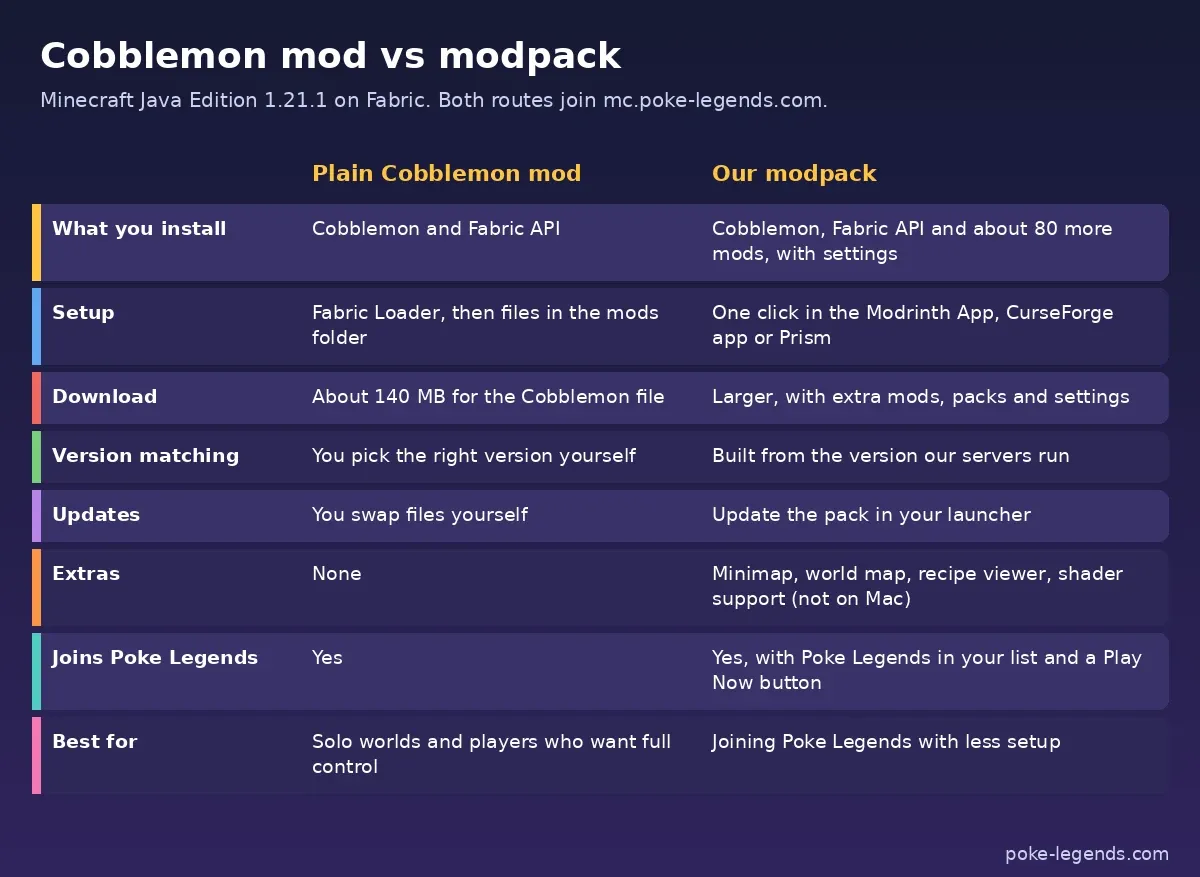
| Plain Cobblemon mod | Our modpack | |
|---|---|---|
| What you install | Cobblemon and Fabric API | Cobblemon, Fabric API and about 80 more mods, with settings |
| Setup | Fabric Loader, then files in the mods folder | One click in a launcher |
| Download | About 140 MB for the Cobblemon file | Larger, with extra mods, packs and settings |
| Version matching | You pick the right version | Built from the version our servers run |
| Updates | You swap files yourself | Update the pack in the launcher |
| Extras | None | Minimap, world map, recipe viewer, shader support |
| Joins Poke Legends | Yes | Yes, with a Play Now button |
| Best for | Solo worlds and full control | Joining Poke Legends with less setup |
Neither one is a wrong answer. The pack trades a bigger download for less work and fewer mistakes. The join guide covers every launcher step for both.
5. The version match that decides most failed joins
The most common reason a player can’t get onto a Cobblemon server is a client that doesn’t match the server. Cobblemon’s newest download is often newer than what a server runs, and a mismatched client gets kicked with a mod or version error.
This is where the mod or modpack choice really matters. With the plain mod, you have to find out which version the server runs and install exactly that one. With a server’s own pack, the matching is done before you download it. That’s why “best Cobblemon modpack for servers” has a simple answer: the best pack for a server is the one built for it.
If you go the plain-mod route with us, install the same Cobblemon version our modpack installs, plus Fabric API. If you ever get kicked, that’s the first thing to check. Our tips and tricks guide has more fixes for your first days once you’re in.
6. Which one to pick for solo, friends or a server
Your choice comes down to where you’ll play:
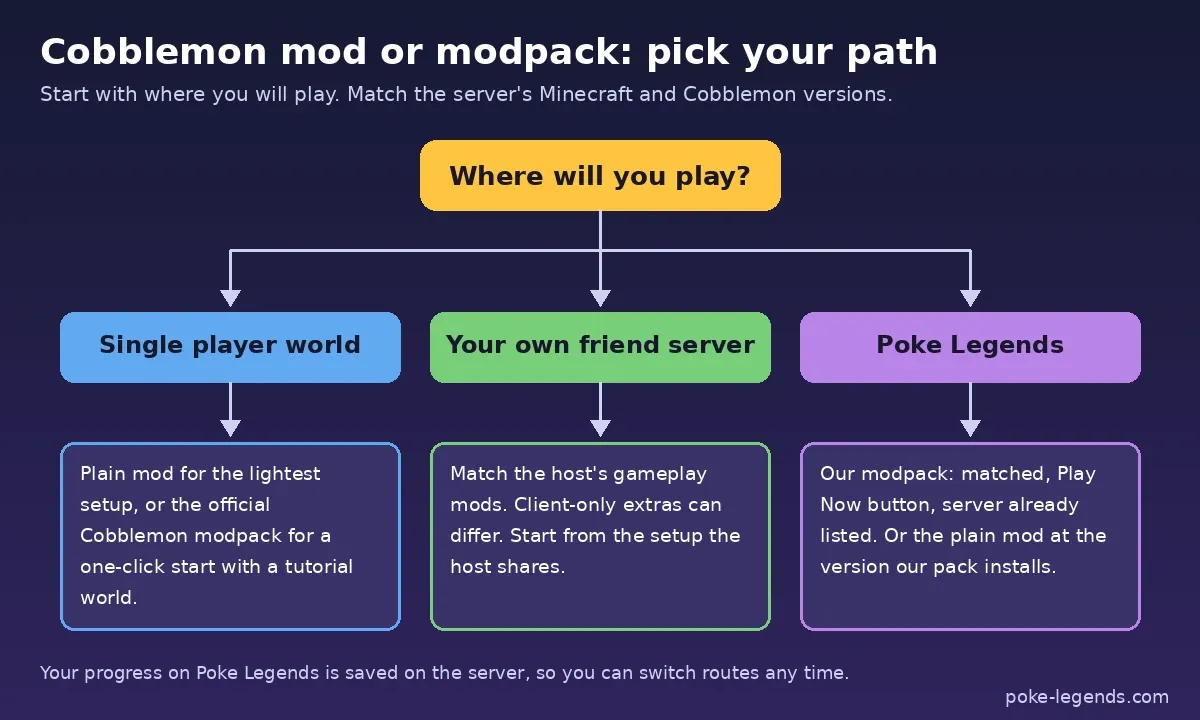
- Single player. Either works. The plain mod is lightest, and the official Cobblemon modpack is a good one-click start with its tutorial world.
- Your own server with friends. Match the host’s Minecraft, Cobblemon and other gameplay mods. The host should pick one setup and share it, so everyone starts from the same working files. Client-only extras do not all have to match. Our guide to playing Cobblemon with friends covers LAN and self-hosting in detail.
- Joining Poke Legends. Grab our modpack for the easiest start, or use the plain mod at the matching version. Both land you in the same hub.
7. What’s inside our modpack
The pack is built for smooth play and fewer clicks. We checked its public file list, and these are the extras you’ll find:
- Performance: Sodium, Lithium, FerriteCore, ImmediatelyFast and Entity Culling.
- Getting around: Xaero’s Minimap and World Map.
- Quality of life: the EMI recipe viewer, Jade to show what you’re looking at, inventory sorting, and an extended Cobblemon battle UI.
- Looks: Iris with a shader pack included, plus Cobblemon interface resource packs. Mac players should leave shaders off, as our pack doesn’t support them on macOS.
- The join: Poke Legends already in your server list, and a Play Now button on the title screen.
Give the game at least 4 GB of RAM, the minimum on our CurseForge page. When we release a new pack version, update it in your launcher so you stay matched. Want to see what’s waiting once you load in? Our server with all Pokémon guide shows everything there is to do.
8. Mistakes to avoid on either path
A handful of slips cause most failed joins, whichever path you pick:
- Launching plain Minecraft. Make sure your launcher started the Cobblemon or Poke Legends profile, not vanilla.
- Grabbing the newest Cobblemon by default. Newest isn’t always what a server runs. Match the server.
- Forgetting Fabric API. Cobblemon on Fabric needs it.
- Declining the resource pack. Our servers require it, so accept it when Minecraft asks.
- Trying it on console or phone. Cobblemon is Java Edition only. Our Cobblemon Bedrock guide explains why.
9. Why Poke Legends is the best place to start
Whichever you install, the next question is where to play it, and that’s where the choice gets easy. Cobblemon has no official server, so you pick one. Poke Legends is the best place to start because you get a matched one-click install without losing the option to run the plain mod, and a full adventure is already waiting on the other side. New to servers? Our best Cobblemon servers for beginners guide explains what to look for.
On Poke Legends: Java Edition 1.21.1. The Cobblemon mod is required, and our free modpack on Modrinth and CurseForge is optional, built from the same Cobblemon version our servers run, with a Play Now button and Poke Legends in your server list. All 1025 Pokémon, 8 NPC gyms plus player gyms, raids, ranked Singles and Doubles, and the GTS and Wonder Trade. Pick Oasis, Serenity or Utopia in the hub. Your progress is saved on the server. IP
mc.poke-legends.com.
🎮 Mod or modpack, you’re one step away. Join mc.poke-legends.com, pick your starter, and come say hi in our Discord.
Frequently asked questions
Should I install the Cobblemon mod or a modpack?
Install the plain mod if you want the lightest setup and like managing your own files. Install a modpack if you want everything set up in one click. If you're joining a server, the best choice is that server's own modpack, because it's built to match the server's versions.
Do I need a modpack to join Poke Legends?
No. The Cobblemon mod for Minecraft Java Edition 1.21.1 is enough to join. Our modpack is optional. It matches our server for you, adds a Play Now button and puts Poke Legends in your server list.
What is the best Cobblemon modpack for multiplayer?
For a server, the best modpack is the one built for that server, because it installs the same Cobblemon version the server runs. For Poke Legends that's our free modpack on Modrinth and CurseForge.
Is there an official Cobblemon modpack?
Yes. The Cobblemon team publishes official modpacks for Fabric and NeoForge on Modrinth and CurseForge. They're made for general play, and the Cobblemon team says Cobblemon has no official server, so you still pick a server to join.
Why does a Cobblemon server kick me with a version error?
Your Cobblemon version doesn't match the server's, or Minecraft started without Cobblemon loaded. Install the version the server runs, or reinstall the server's modpack, then launch with Cobblemon.
Can I switch from the plain mod to the modpack later?
Yes. On Poke Legends your Pokémon and progress are saved on the server, not on your PC, so you can swap your setup or reinstall any time without losing anything.