Cobblemon Fabric or Forge: Which Loader Should You Use?
By Poke Legends Team · Published · Last updated
For Cobblemon, pick Fabric: current Cobblemon comes for Fabric and NeoForge (not old Forge), and the Cobblemon team itself recommends Fabric because it has better performance. NeoForge is a fine second choice if the rest of your mods need it, but for most players, and for joining a server that runs Fabric, Fabric is the answer.
This is the official website of the Poke Legends Cobblemon server. Most “Fabric or Forge” answers online were written before NeoForge existed, so below we sort out the names, show exactly what each loader needs, and explain the one mistake that gets most new players kicked.
If you want to skip the loader question and just play, the short steps are on our join page.
1. Why Poke Legends is the best place to play Cobblemon on Fabric
Picking a loader is only step one. The real goal is a working game on a server worth playing, and that is where we make the choice easy:
- We run Fabric on Minecraft Java Edition 1.21.1, the loader the Cobblemon team recommends. A Fabric client matches us with nothing to change.
- We say what we run. Java 1.21.1, Fabric, and the Cobblemon build our worlds use, all spelled out in our Cobblemon server 1.21.1 guide, so you never have to guess.
- Our free modpack sets the loader up for you. It is on Modrinth and CurseForge, matches the server versions, includes Fabric API, and puts Poke Legends in your server list.
- The mod is all you need. The Cobblemon mod is required and the modpack is optional. Gyms, ranked battles and Mega Evolution run on our side.
- There is a full game behind the login: all 1025 Pokémon, 8 NPC gyms from Bug at level cap 20 to Dragon at cap 90, and ranked Singles and Doubles with Mega Evolution and Z-Moves.
Your Pokémon are saved on the server, so changing launchers or reinstalling never costs you progress.
2. Fabric, Forge and NeoForge: what the names mean
A mod loader is the layer that lets Minecraft Java Edition run mods. Cobblemon is built for specific loaders, so the loader decides which Cobblemon file you download.
Fabric is a lightweight loader. Most Fabric mods, Cobblemon included, also need Fabric API, a separate library mod that goes in the same mods folder.
Forge is the loader many players grew up with, which is why so many people still search “Cobblemon Fabric or Forge.” In July 2023 almost all of the Forge team left to start NeoForge, a fork of Forge, according to the NeoForged project’s own announcement. NeoForge has carried that line forward on newer versions of Minecraft.
That history shows up in Cobblemon’s release list on Modrinth. Older Cobblemon releases came for Fabric and Forge on older Minecraft versions, and the last Forge builds came out in May 2024. Every Cobblemon release for Java 1.21.1, from December 2024 on, comes in a Fabric build and a NeoForge build, with no Forge build. So when someone says “Forge” for current Cobblemon, they almost always mean NeoForge. Our Cobblemon vs Pixelmon guide covers how loaders split the two biggest Pokémon mods, too.
3. Cobblemon Fabric vs NeoForge at a glance
Here is the whole comparison on one card, taken from Cobblemon’s project page and release list:
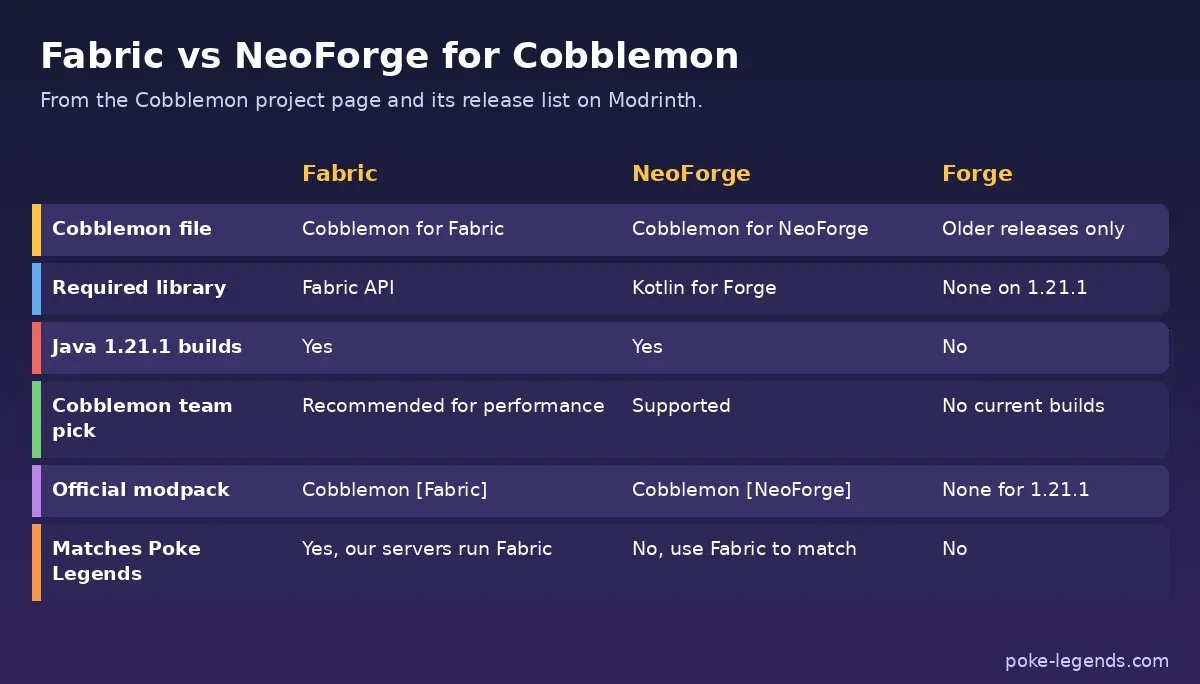
| Fabric | NeoForge | |
|---|---|---|
| Cobblemon file | Cobblemon for Fabric | Cobblemon for NeoForge |
| Loader to install | Fabric Loader | NeoForge |
| Required library | Fabric API | Kotlin for Forge |
| Java 1.21.1 builds | Yes | Yes |
| Cobblemon team’s pick | Recommended, “better performance” | Supported |
| Official Cobblemon modpack | Cobblemon [Fabric] | Cobblemon [NeoForge] |
| Matches Poke Legends | Yes, we run Fabric | Use Fabric to match us |
Two details catch people out. First, the NeoForge library is called Kotlin for Forge, even though Cobblemon’s install steps list it for NeoForge. Second, each Cobblemon file is built for one loader, so a Fabric file belongs with Fabric and a NeoForge file belongs with NeoForge. Our how to join a Cobblemon server guide shows the matching setup in the Modrinth App, CurseForge and Prism.
4. Why Fabric is the one we recommend
The best evidence is the Cobblemon team’s own words. Its project page says it supports both Fabric and NeoForge, “though we recommend playing on Fabric because it has better performance.” We don’t add speed numbers on top of that, because real performance depends on your PC, your other mods and your settings, but when the people who build the mod name a favorite, that is a strong default.
Fabric is also the simpler stack for Cobblemon. On Fabric you install the loader, add Fabric API and Cobblemon, and you’re done. Cobblemon’s install steps put Fabric first, and its official modpack comes in a Fabric version on both Modrinth and CurseForge.
For server players there is one more reason that matters most: match the server. A server picks one loader, one Minecraft version and one Cobblemon build. Ours is Fabric on Java 1.21.1, so a Fabric client is the setup that lines up with it. Our modpack is built on Fabric for exactly that reason, and it stays in sync with the server through Modrinth or CurseForge updates.
5. When NeoForge makes sense
NeoForge isn’t a bad choice. Cobblemon supports it officially, ships a NeoForge build of every Java 1.21.1 release, and keeps an official NeoForge modpack. Pick it if:
- The mods you can’t live without are NeoForge only. Mods are built for a loader, so your loader should be the one your must-have mods support.
- You already run a NeoForge setup for a solo world and just want to add Cobblemon to it.
- You host a private world for friends and everyone agrees on a NeoForge pack. Everyone in that world should use the same loader, mods and versions as the host. Our guide to playing Cobblemon with friends covers LAN and hosting your own world.
If none of those apply, start on Fabric. And when you join a public server, the server’s loader decides, not your preference. For Poke Legends, that means Fabric.
6. How to install Cobblemon on Fabric
There are two routes, and both end with the same setup.
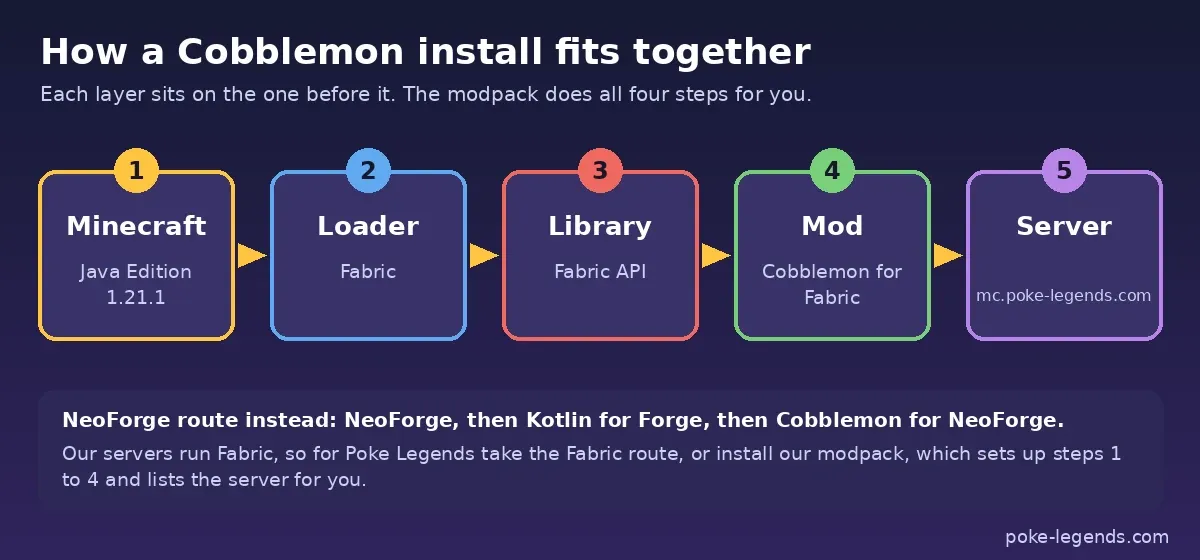
The easy route: a modpack. Install the Modrinth App, CurseForge or Prism Launcher, search for Poke Legends, and install our modpack. It downloads Minecraft 1.21.1, Fabric, Fabric API and the matching Cobblemon in one go, and lists our server for you.
The manual route:
- Install Fabric Loader for Minecraft Java Edition 1.21.1 with the installer from Fabric’s website, or create a Fabric instance in your launcher.
- Download Fabric API for 1.21.1 and put it in the mods folder.
- Download the Fabric build of Cobblemon, in the version the server runs, and put it in the same folder.
- Launch the Fabric profile, open Multiplayer, then Add Server, enter
mc.poke-legends.comand accept the server resource pack.
Give Minecraft at least 4 GB of RAM. Java 1.21.1 needs Java 21, which the Modrinth and CurseForge apps set up for you. The full click-by-click steps are on our join page.
7. Common loader mistakes and how to fix them
| Mistake | Fix |
|---|---|
| Downloading “Cobblemon Forge” for Java 1.21.1 | There is no such build. Use Fabric, or NeoForge if your mods need it. |
| Putting the NeoForge file in a Fabric profile, or the other way round | Download the Cobblemon file made for your loader. |
| Fabric profile, but no Fabric API | Add Fabric API for 1.21.1 to the mods folder. |
| NeoForge profile, but no Kotlin for Forge | Add Kotlin for Forge. It works on NeoForge despite the name. |
| Kicked with a mod or version error on a server | Match the server’s Cobblemon build, or install its modpack. |
| Minecraft opens without Cobblemon | Start the Fabric or modpack profile, not plain Minecraft. |
The version error is the big one. Cobblemon’s newest download can be newer than what a server runs, so always match the server rather than grabbing the latest file. Our modpack does that for you. One more mix-up: no loader brings Cobblemon to consoles or phones, because Cobblemon is Java Edition only. Our Cobblemon Bedrock guide explains why.
On Poke Legends: our servers run Fabric on Minecraft Java Edition 1.21.1. The Cobblemon mod is required, and our free modpack on Modrinth and CurseForge is optional: it matches the server versions, includes Fabric API and lists the server for you. Three worlds, Oasis, Serenity and Utopia. All 1025 Pokémon, 8 NPC gyms from Bug (20) to Dragon (90), and ranked Singles and Doubles with Mega Evolution and Z-Moves. IP
mc.poke-legends.com.
Fabric is the loader the Cobblemon team recommends, and it’s the loader we run, so the choice and the server line up. Install Fabric with Cobblemon, or let our modpack do it, and the only decision left is which starter to pick.
🎮 Ready to play? Join mc.poke-legends.com on Java 1.21.1, and come say hi in our Discord if your install gives you any trouble.
Frequently asked questions
Is Cobblemon Fabric or Forge?
Both, in a way, but not old Forge. Cobblemon for Minecraft Java Edition 1.21.1 comes in two builds, one for Fabric and one for NeoForge, which is the newer fork of Forge. Cobblemon's Forge builds only exist for older Minecraft versions.
Is Cobblemon better on Fabric or NeoForge?
The Cobblemon team recommends Fabric. Its project page says it supports both Fabric and NeoForge, "though we recommend playing on Fabric because it has better performance." Pick NeoForge only if the other mods you want are NeoForge only.
What do I need to run Cobblemon on Fabric?
Minecraft Java Edition 1.21.1, Fabric Loader, Fabric API and the Fabric build of Cobblemon in your mods folder. A launcher like the Modrinth App, CurseForge or Prism can set all of that up for you from a modpack.
What do I need to run Cobblemon on NeoForge?
Minecraft Java Edition 1.21.1, NeoForge, Kotlin for Forge and the NeoForge build of Cobblemon. Kotlin for Forge has Forge in its name, but it is the library Cobblemon's own install steps list for NeoForge.
Is Poke Legends on Fabric or NeoForge?
Fabric. Install the Fabric build of Cobblemon for Java 1.21.1, or use our optional modpack, which sets up Fabric, Fabric API and the matching Cobblemon for you.
Do I need a modpack to join Poke Legends?
No. You need the Cobblemon mod for Minecraft Java Edition 1.21.1. Our modpack is optional and sets everything up for you.