Cobblemon Base Ideas: How to Build a Base That Works
By Poke Legends Team · Published · Last updated
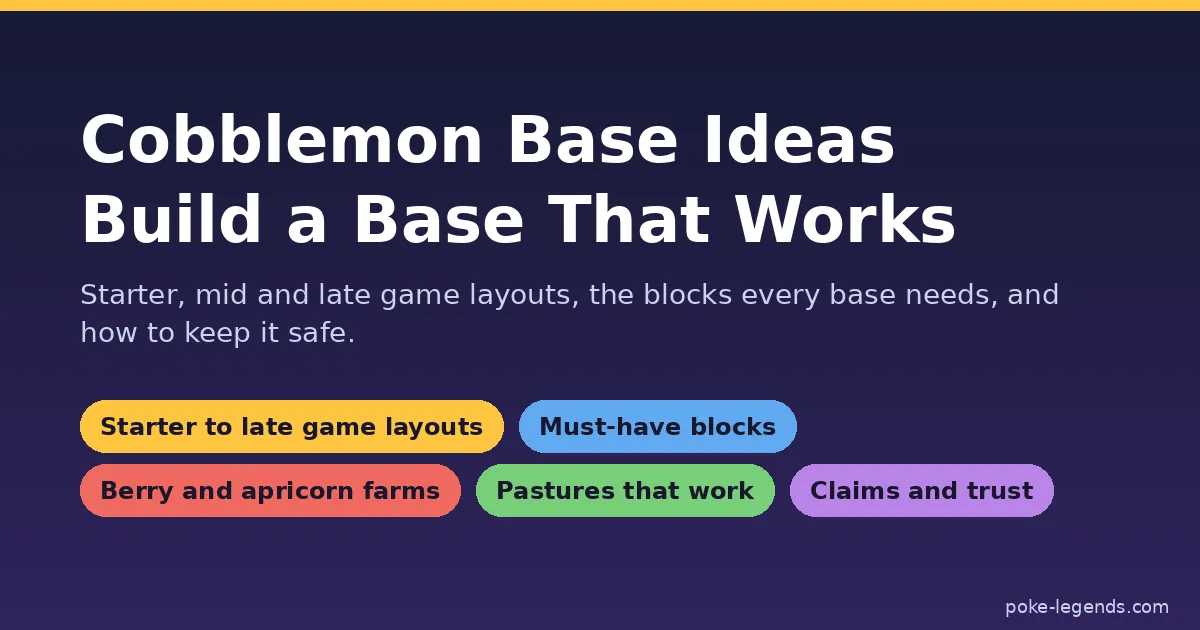
The best Cobblemon base ideas start with function: a PC and a Healing Machine by the door, berry trees and apricorns within reach, a Pasture Block for your favorites, and a claim with room to grow, then style on top. Below are three top-down layouts you can copy, starter, mid game and late game, plus the blocks that make each one work and how to keep your build safe.
This is the official website of the Poke Legends Cobblemon server. Most base guides are a gallery of pretty builds. This one is a plan, with every block recipe checked against the Cobblemon mod.
If you want to build your base on a server where it stays yours, the short steps are on our join page.
1. Why Poke Legends is the best Cobblemon server for building a base
A base is only worth building if nobody can wreck it and your friends can actually find it. On Poke Legends, the tools are there from your first night, and our survival server guide covers them in full:
- Land claims with a golden shovel or
/claim. A claim protects the whole column from bedrock to the build limit, in the overworld, the Nether and the End. - Your first chest is never left open. Place one without a claim and the server claims a small area around it for you.
- Five trust levels, so a friend can open doors without touching your chests, or build with you without owning the place.
- Homes from day one. You start with 2, and when you die you respawn at your first home.
- Player warps so other players can visit your base, farm or shop, find it in
/pwarpsand leave a rating. - A separate Resource World for mining, so the land around your base stays good looking.
- 16 skills that fit base life, including Harvest Moon, which harvests and replants crops around you and respects land claims.
2. Pick your spot before you place a block
Location decides half of your base. Use /rtp (or /wild) to drop somewhere safe in the wild, or /biomertp to pick a biome first. Biome travel matters for farmers: berry trees give a bonus yield in their preferred biome, so Cheri and Wepear like plains, Chesto likes forests, and Lum and Aguav like jungles and swamps. Our berries guide has the full list.
Then claim before you build. Right-click one corner with a golden shovel, walk to the opposite corner, and right-click again. The smallest claim is 5 x 5, and every block of area costs one claim block, so a 20 x 20 claim costs 400.
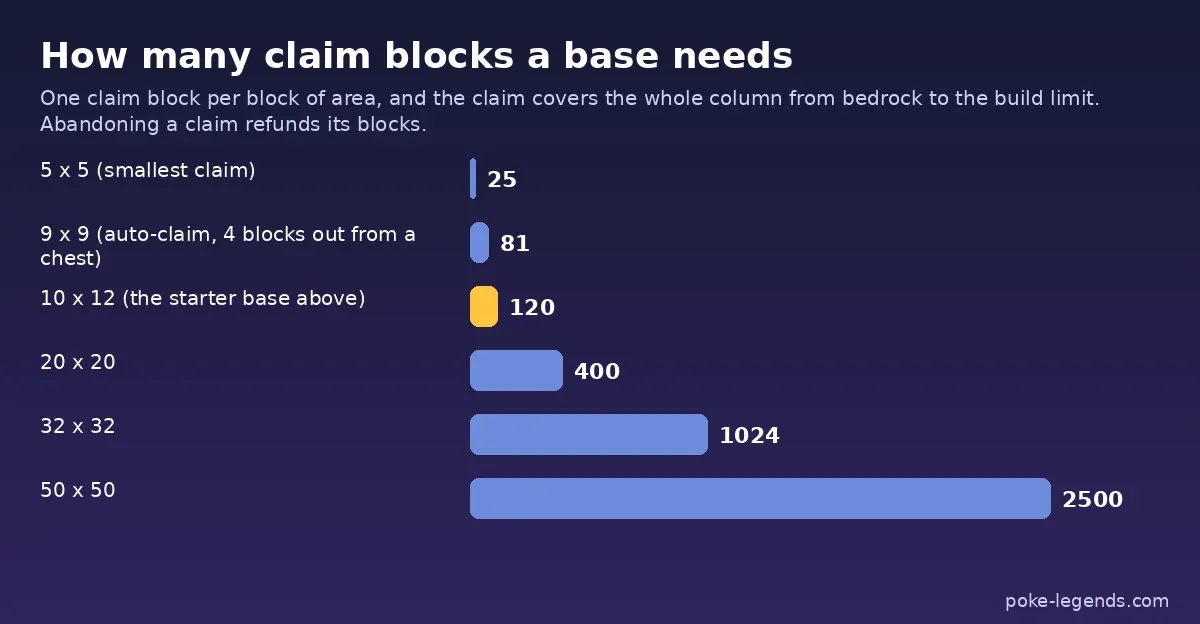
New players start with 120 claim blocks, enough for a 10 x 12 starter plot. You earn more by playing, and the Claim Blocks page of the in-game /shop sells them for in-game money. To grow a claim, stand in it, use /abandonclaim to get all of its blocks back, and claim the bigger area. Never build in the Resource World, because it gets reset. Our claims and homes wiki has every command.
3. The must-have blocks for every Cobblemon base
Every good Cobblemon base is built around a handful of mod blocks. Get these first, and the rest is decoration.
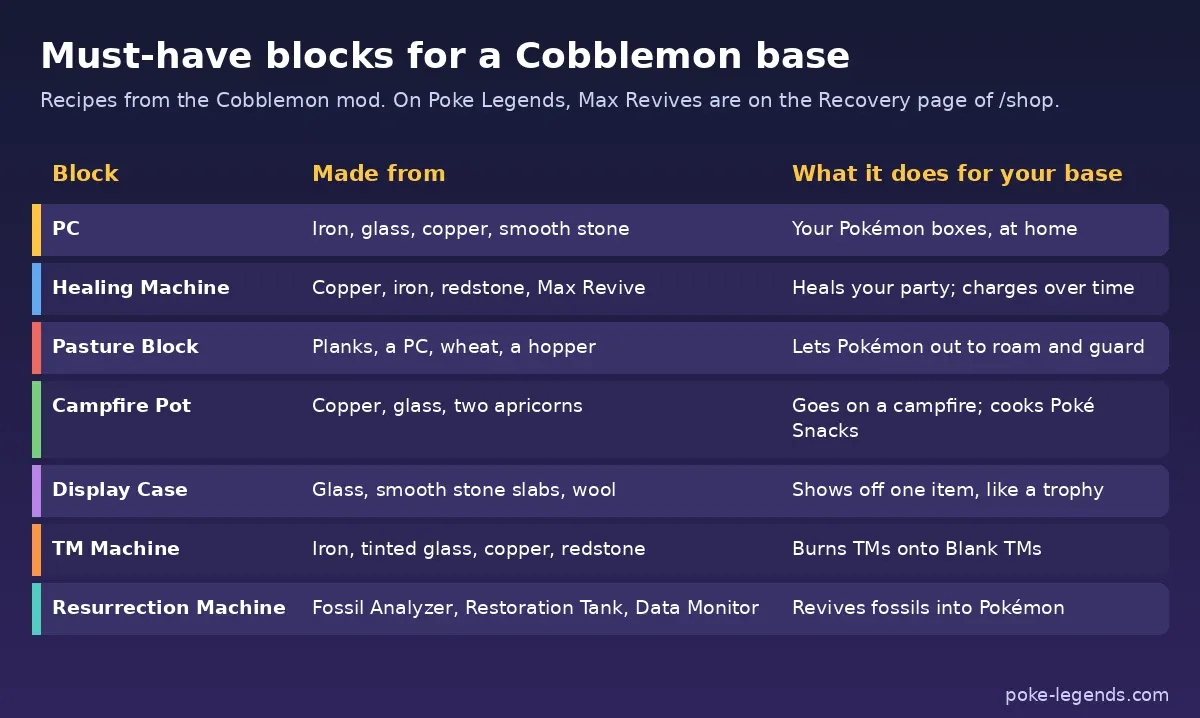
| Block | Made from | Why it belongs in your base |
|---|---|---|
| PC | Iron, glass, copper, smooth stone | Opens your Pokémon boxes, with filters and sorting |
| Healing Machine | Copper, iron, redstone, a Max Revive | Heals your party, and charges up over time once placed |
| Pasture Block | Planks, a PC, wheat, a hopper | Lets Pokémon out to roam, and they can fight hostile mobs |
| Campfire Pot | Copper, glass, two matching apricorns | Sits on a lit campfire and cooks Poké Snacks |
| Display Case | Glass, smooth stone slabs, wool | Shows off a single item |
| TM Machine | Iron, tinted glass, copper, redstone | Burns TMs onto Blank TMs with Type Gems |
| Resurrection Machine | Fossil Analyzer, Restoration Tank, Data Monitor | Revives fossils into Pokémon |
The Healing Machine is the one people build last and regret. Place it on day one, because it starts empty and charges while you explore. On Poke Legends, the Max Revive it needs is on the Recovery page of /shop. Our tips and tricks guide covers the PC filters that find every shiny in your boxes.
4. Cobblemon starter base ideas: the first night
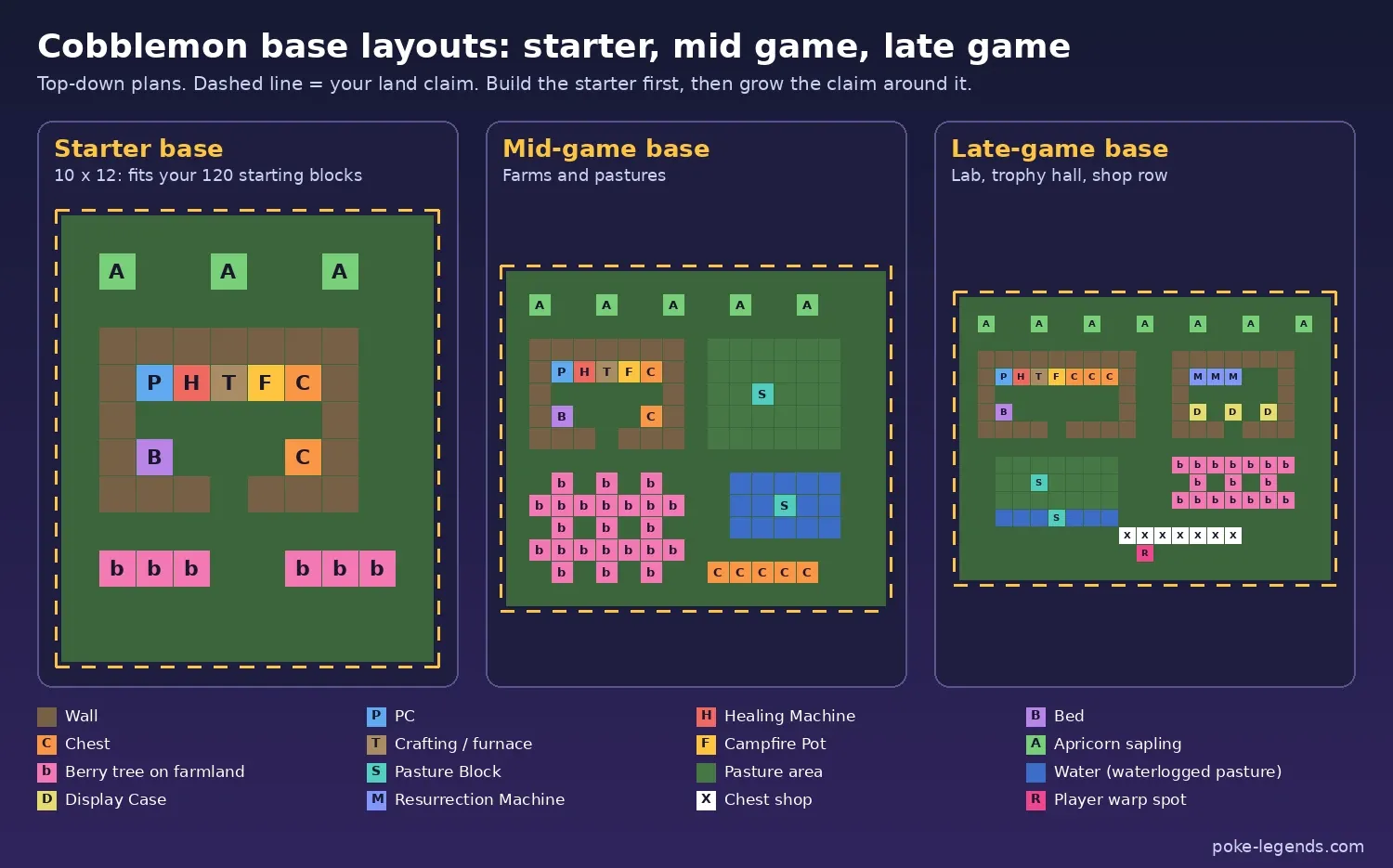
Your first base should be small, close to good land, and built for the trip back after a long hunt. The starter plan above fits inside your 120 starting claim blocks:
- One room, one wall of utility. PC, Healing Machine, crafting table, furnace, Campfire Pot and a chest in a row, so you walk in, heal, stash your loot and head out.
- A bed and a home. Run
/sethomeinside. Your first home is where you respawn. - Three apricorn saplings outside. Plant Apricorn Sprouts on dirt or grass. Each one needs a 1 x 1 column of 5 empty blocks above it to grow, so don’t roof them in.
- Two small berry patches on farmland in front of the door.
If you’d rather not wander for rare apricorn trees, the Plants & Planks page of /shop sells all seven Apricorn Sprouts. Our starter Pokémon guide helps you pick the partner who’ll guard it.
5. Mid-game base ideas: farms, pastures and a breeding corner
Once you have a team, your base turns into a production line. Grow the claim around the starter house instead of moving.
Berry farm. Cobblemon berries mutate when a mature tree has the right partner directly north, east, south or west of it, never diagonal. A cross pattern, like the one in the mid-game plan, gives each tree more than one straight neighbour. Surprise Mulch helps a mutation along, and the berries guide has the full mutation chart.
Apricorn orchard. Plant one sapling of each of the seven colours and you have every apricorn the Poké Ball recipes call for. Bone meal pushes a growing apricorn to its next stage, and every harvest leaves a bud behind to grow again.
Pastures. On Poke Legends each Pasture Block holds up to 4 Pokémon. Pastured Pokémon can attack hostile mobs, which you toggle with the sword icon, so a pasture by the door doubles as base security. Pasture Blocks can be waterlogged too, so a pond pasture lets Water types swim. If one area gets crowded, the block will say there are too many Pokémon nearby, so give each pasture its own patch, like the two in the plan.
Breeding corner. Breeding runs through the /daycare command, so you don’t need a building for it. Put a chest of Destiny Knots, Everstones and Power items next to your PC instead. Our breeding guide explains each one.
6. Late-game base ideas: a fossil lab, a trophy hall and a shop row
By the late game your base should show off what you’ve done and make you money while you sleep.
- Fossil lab. A Resurrection Machine is three blocks placed together: the Fossil Analyzer, the Restoration Tank and the Data Monitor. Give it its own room, with a chest of organic material next to the tank. Our fossils guide covers every fossil.
- Trophy hall. Display Cases show off one item each, like a Mega Stone or a rare ball. Hang Pokémon paintings from the Paintings page of
/shop, and put a music disc from the Music Shop into a Data Monitor to light up its screen. - Shop row. Chest shops keep selling while you’re offline. Build them on claimed land so nobody can break them, then add a player warp.
- A warp pad. Stand where visitors should arrive and run
/pwarp create [name]. Pick a category (Building, Shop, Farm, PvP, Event, Fun or Other) so players can find you, and let the ratings roll in.
Our player shops guide walks through chest shop signs and the public Shops list.
7. Build with friends or a guild
A shared base needs shared rules. /trust [player] gives a friend access, and /trust [player] [level] sets exactly how much. The main trust levels are:
- Accessor: doors, buttons and levers.
- Container: also opens chests.
- Builder: also places and breaks blocks.
- Manager: a part-owner who can manage the claim and trust others. Give this one carefully.
/trustlist shows who has access to the claim you’re standing in. For a bigger crew, a guild can set a Guild HQ and named warps that every member can travel to, so a group base and its HQ can sit side by side. See our guilds guide for how guilds work.
8. Base rules that keep your build standing
A few server rules shape how big your farms can get, so plan for them before you lay out redstone. Our server rules have the full list:
- Redstone automation needs a manual on/off toggle and shouldn’t be large. Dispensers with shears can harvest berries and apricorns, so put a lever on them.
- No always-on redstone, no 0-tick farms, and nothing that keeps running while you’re offline.
- No lag-heavy designs with huge numbers of entities, minecarts or dropped items. That’s another reason to spread out your pastures.
- Log in now and then. Claims of long-inactive players are removed.
9. Start your base on Poke Legends
Join, pick a world in the hub, /rtp until you love the view, and claim it. New to servers? Our how to join guide covers every step.
On Poke Legends: land claims with a golden shovel or
/claimthat protect the whole column, from a 5 x 5 minimum, with 120 claim blocks to start and an automatic claim around your first chest. Five trust levels with/trust. 2 homes from day one, and you respawn at your first. Player warps with categories and ratings in/pwarps. Apricorn Sprouts, Max Revives and Pokémon paintings in the in-game/shop. A separate Resource World for mining,/biomertpto choose a biome, and guild HQs for group bases. All 1025 Pokémon. Java Edition 1.21.1 with the Cobblemon mod; our modpack is optional. IPmc.poke-legends.com.
🎮 Ready to build? Join mc.poke-legends.com, claim your first plot, and share your base in our Discord.
Frequently asked questions
What should every Cobblemon base have?
A PC, a Healing Machine and a bed by the door, a chest wall, and a Campfire Pot for Poké Snacks. Next come berry trees on farmland, a few apricorn saplings and a Pasture Block. A Display Case and a Resurrection Machine make good late game additions.
How do I protect my base on Poke Legends?
Claim it with a golden shovel or /claim by right-clicking two opposite corners. The claim covers the whole column from bedrock to the build limit, and placing your first chest without a claim auto-claims a small area around it. Use /trust to let friends in.
How big should my first Cobblemon base be?
Small. New players start with 120 claim blocks, and a claim costs one block per block of area, so a 10 x 12 plot fits a cozy starter base. Claim a little more than you need so you have room to grow, and abandon and reclaim to resize it later.
How many Pokémon can a Pasture Block hold?
On Poke Legends each Pasture Block holds up to 4 Pokémon. If the area around it gets too crowded, it will say there are too many Pokémon nearby, so give each pasture its own patch of land.
Where should I not build my base?
Not in the Resource World. It gets reset, and claiming there is not for bases. Build in the main world, use /rtp or /biomertp to find a spot, and keep the Resource World for mining.
Do I need a modpack to join Poke Legends?
No. You need the Cobblemon mod for Minecraft Java Edition 1.21.1. Our modpack is optional and sets everything up for you.